Securing Data
What is encryption?
Encryption is a process of obscuring information so that only the intended audience can read and understand it. This is done using complex algorithms and passwords to encrypt and decrypt messages.
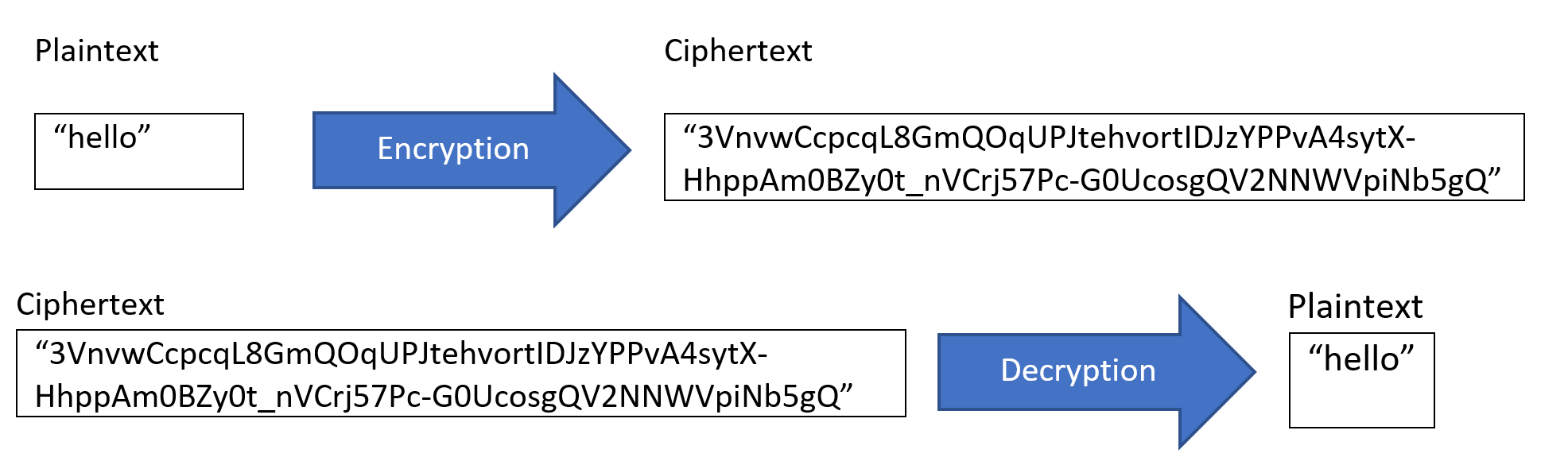
In the example above, if you saw the ciphertext, you wouldn’t be able to read it, but with the decryption key (or password), you’ll be able to convert the message back to “hello”.
Here's a demo of how encryption works.
Why should you encrypt data?
- Privacy: If the data is encrypted, only the intended person will be able to read it.
- Security: Encryption can prevent data breaches.
- Data Integrity: encryption helps to ensure the data hasn’t been tampered with.
- Regulations: If you are working with Personally Identifiable Information (PII) or sensitive data, many countries have regulations on encrypting the PII or sensitive data such as HIPPA (for health-related data being billed to the US government), PCI-DSS (for credit cards), and GDPR (for EU citizens). Most privacy laws have a safe harbor clause. If encrypted PII is stolen or breached, you will not need to notify people that their PII was stolen or breached.
Why you need strong passwords
When you encrypt data, you need to use strong passwords. If a bad actor can figure out the password, the data is no longer secure. There are many ways to hack passwords. A bad actor can use brute force. The attacker can try the most popular passwords or loop through a dictionary in various languages to figure out the passwords. There is also free open-source software (such as John the Ripper) to crack passwords. My recommendation is to use strong passwords, don’t reuse passwords, and use a password manager.
World laws on encryption
In some countries, encryption is illegal. Before you start a project in a new country, it’s important to look up the encryption and VPN regulations. Here are some references:
- World map of encryption laws and policies
- Encryption laws: Which governments place the heaviest restrictions on encryption?
- Are VPNs Legal In Your Country?
If you are working in a country where encryption or VPNs are illegal to use, avoid storing sensitive data. Here are some additional recommendations.
Storing files securely
Data can be encrypted “at rest” when it is stored. Data can also be store “in transit” when it is being transmitted somewhere.
If you are going to email a file or upload it to cloud storage, it’s a good idea to encrypt it first. Here is a few free open-source software that can encrypt files for you. When you email an encrypted file, make sure that you share the password outside of email.
- 7-zip - an open-source file compressor that also has strong (AES-256) encryption when saving files in 7z and ZIP format. Here are instructions for encrypting with 7z.
- Cryptomator
- GNU Privacy Guard
If you work in an environment where you don’t trust the local government, and you have sensitive data stored on your phone or laptop, you should encrypt your devices to protect the sensitive data in case your device is stolen.
How to encrypt your computer and phone?
- Encrypting your computer on Windows 10
- Encrypting your MAC with FileVault
- Encrypting your Android
- Encrypting your iPhone and iPad
- VeraCrypt - VeraCrypt is a free open-source disk encryption software for Windows, Mac OSX and Linux. You can encrypt part of your hard drive.
Sharing files securely
To share files securely, you need to have a secure internet connection. If you are using public Wi-Fi (i.e., at an airport, hotel, restaurant, etc.), connect to a VPN before sharing files or checking email.
Use websites that begin with https. The s after http means it is encrypted. Do not log into accounts that do not begin with https.
Let’s say a subcontractor is collecting data for your organization, and you want to find a secure way to share the data between organizations (or within your organization). My recommendation is to encrypt the files and then upload to the cloud. You can control who has access to your cloud provider. After the data is in the cloud, you can email a link to the cloud storage.
Most cloud storage is encrypted. You can use azure, aws, box, dropbox, pCloud, etc. There are many options.
Another method of sharing files securely is using the Tor network. Here are a few secure open-source tools for sharing files:
Avoid emailing data. Emailing data makes it hard to keep track of who has access to the data, where the data is located, and which version you’re looking at. You could run into issues with people unintentionally emailing data outside your organization. There are also data retention challenges. If you must email sensitive data, use a provider with encrypted email such as proton mail or Fast Mail.
Avoid using thumb drives to share files. When moving files between computers within an office, thumb drives can be very useful. There are two challenges with thumb drives. It’s so easy for thumb drives to get lost and stolen. It's also easy to pick up many viruses on thumb drives. When I was in Peace Corps, I used to get so many viruses on my thumb drive every time I plugged it into a computer at the school or at a printing shop. If you use a thumb drive, encrypt the files before moving them onto the thumb drive to protect the data in case the thumb drive gets lost. You can also scan the thumb drive for viruses.
When data is encrypted both at rest and in transit, and no third-party tool has the decryption key, it’s known end-to-end encryption (E2EE). This is the most secure way to send information. My favorite E2EE messaging app is Signal. iMessage and WhatsApp are also supposedly E2EE. There was an interesting lawsuit in 2016 where the US government asked Apple to unlock an iPhone. Apple refused to build-in a backdoor, because Apple was concerned that a malicious actor could use it against them.